
999R Registration Steps – User Guide
Registering for the 999R Game is a straightforward process for Pakistani users who want to explore an online gaming platform from their mobile device. The signup steps are designed to be simple, so even beginners can create an account without advanced technical knowledge. After registration, users can access the available games, account features, and current promotional offers according to the platform’s terms.
Some new users may avoid registration because they expect a lengthy process or complicated requirements. In many cases, basic account information such as a mobile number is needed to get started, although verification requirements can vary. Before registering, make sure you are using the official platform and review its privacy, payment, and account policies so you understand how your information will be handled.
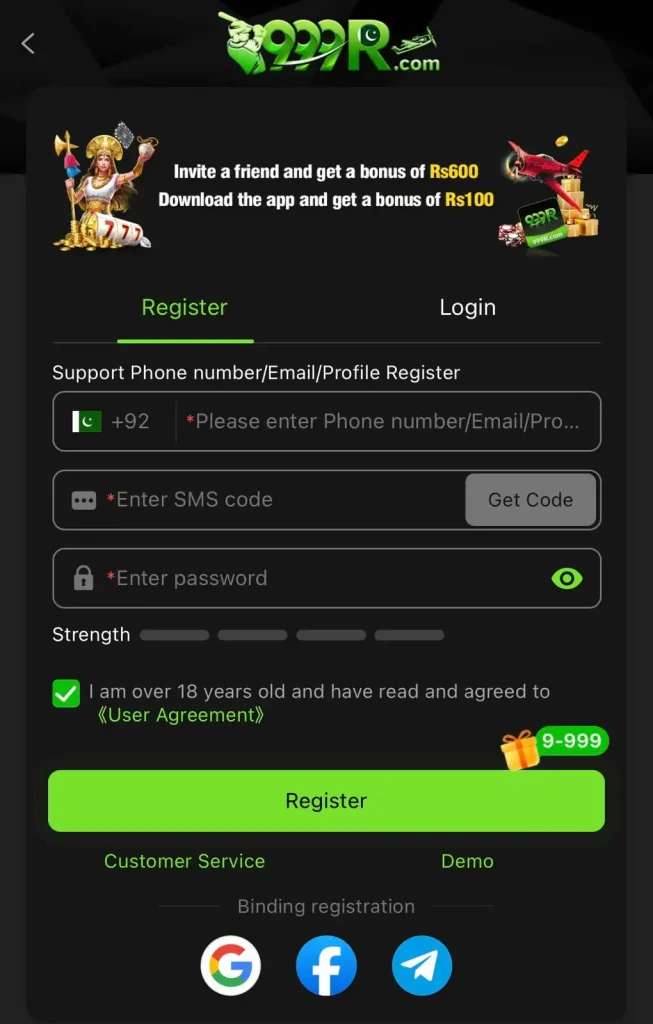
How to Register Your Account on 999R Game App?
Creating an account on 999R Game is a straightforward process that usually takes only a few minutes. Follow the steps below carefully to complete your registration and access the available games and account features.
Access Official Website:
- Open your mobile browser and enter the official 999R Game website address: https://999rgames.com.pk/
- Avoid opening registration links received from unknown messages or unverified social media accounts.
- Check the website address carefully before entering any personal information.
- Use a reliable internet connection to prevent interruptions while the page loads.
Visit Registration Section:
- Find the Register or Sign Up button on the website’s main page.
- Tap the button to open the account registration form.
- Confirm that you are on the correct registration page before entering your details.
- Avoid using unofficial third-party websites or modified apps to create your account.
Fill Up Your Details:
- Enter an active Pakistani mobile number in the required field.
- Check your number carefully to make sure there are no typing errors.
- Create a strong password using a combination of letters, numbers, and symbols.
- Enter your name, username, or other information if requested by the registration form.
Tap on Register Button:
- Review your information carefully before submitting the form.
- Read and accept the terms and conditions if you agree with them.
- Select the Register or Create Account button to submit your details.
- Complete any verification step requested by the platform and wait for the registration confirmation.
Important Tips to Make Your Account Secure
Taking a few security precautions when creating your 999R Game account can help protect your login details and personal information. Good account habits are especially important when using a real-money gaming platform, so keep the following tips in mind.
- Create a strong, unique password that you do not reuse on other websites or apps.
- Turn on two-factor authentication if this security feature is available on your account.
- Never share your password, OTP, or verification codes with anyone, including people claiming to be support staff.
- Log out after each session, particularly when using a shared smartphone or public device.
- Keep the 999R Game app and your phone’s operating system updated whenever new security updates are available.
What To Do After Registration?
- Check the promotions section for any current welcome offers and review their terms before claiming.
- Complete your profile with the required information and add a profile picture if the option is available.
- Open the games section and explore different titles to understand the available options.
- If you decide to deposit, use a supported method such as Easypaisa, JazzCash, or bank transfer.
- Start with small amounts and learn the rules of each game before increasing your spending.
- Explore the referral section if you want to invite friends and check the current commission requirements.
- Enable relevant account notifications so you can stay informed about available promotions and platform updates.
How To Fix Registration Problems?
Users may occasionally encounter difficulties while creating a 999R Game account, but many common registration issues can be resolved with a few simple checks. If the problem continues after trying these steps, use the platform’s official support channel for further assistance.
Problem: OTP code is not received on your mobile number
- Wait briefly before requesting another verification code.
- Check your SMS inbox and confirm that your phone has a stable network signal.
- Make sure the mobile number entered during registration is correct.
- Try accessing the official website instead of the app if available.
- Contact official customer support if you still cannot receive the code.
Problem: App is not downloading or installing properly
- Check your internet connection and switch between Wi-Fi and mobile data if needed.
- Make sure your Android device has sufficient free storage.
- Clear your browser cache and restart the download if the file is incomplete.
- Check your phone settings if Android blocks installation from the selected source.
- Download the APK only from the official 999R Game website or a trusted source.
Problem: Error message appears during registration
- Recheck your mobile number and other information for typing errors.
- Refresh the page or try registering through another supported browser.
- Restart your device and attempt the registration again after a short wait.
- Clear the app cache if you are using the 999R Game application.
- Contact official support if the same registration error continues.
Problem: Account already exists with this number
- Try signing in instead of creating another account with the same mobile number.
- Use the Forgot Password option if you cannot remember your login details.
- Contact official support if you believe your number has been registered without your permission.
- Avoid creating duplicate accounts, as multiple-account rules may result in restrictions.